

Nol Card Balance Check is useful before taking the Dubai Metro, bus, tram, or other RTA public transport because you need enough credit on your card to travel. In 2026, RTA provides an official balance-check option on its website, while the Nolol Pay app lets users check their card information and balance through their phone. You can also check your card at physical RTA facilities and use your balance information while managing or topping up the card.
If you want the quickest option, use the RTA website when you have your 10-digit Nol Tag ID or use Nol Pay if your phone supports NFC. RTA currently states that a Nol card needs at least AED 7.50 to use public transport, so checking your balance before travelling can help you avoid problems at the gate.
Quick Nol Card Balance Check Options
| Method | What You Need | Best For |
| RTA website | 10-digit Nol Tag ID | Quick online check |
| Nol Pay app | Nol card + compatible phone | Fastest mobile option |
| RTA Dubai app | Nol card/account details | RTA app users |
| S’hail app | Nol Tag ID or NFC | People already using S’hail |
| Metro ticket machines | Physical Nol card | Checking at a station |
| Metro ticket office | Physical Nol card | Personal assistance |
| Solar top-up machines | Physical Nol card | Selected locations |
| Nol service locations | Physical card | In-person help |
| Card reader/validator | Physical card + journey | Quick check while travelling |
| Top-up screen | Physical card | Checking before recharging |
Important: Not every item above is a separate standalone RTA “balance-check service.” RTA officially identifies the RTA website and Nol Pay app as its direct balance-check methods. Some other options let you see or confirm the card balance while using RTA equipment or managing the card.
1. Nol Card Balance Check Through the RTA Website
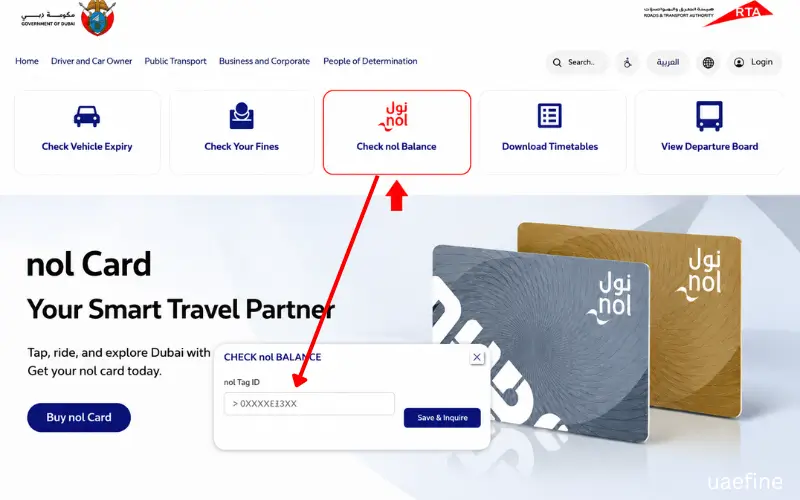
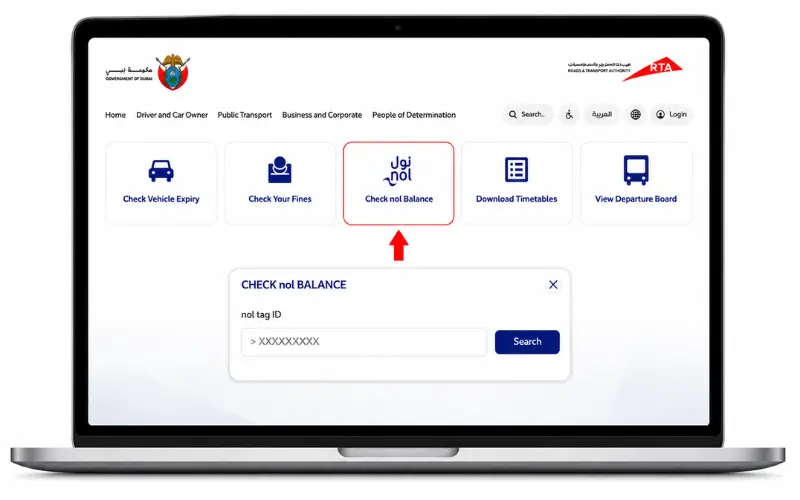
The RTA website is one of the simplest ways to check a Nol card balance without installing an app. RTA currently displays a “Check Nol Balance” service that asks for your Nol Tag ID.
How to Check Nol Balance Online
- Open the official RTA website.
- Find Check Nol Balance.
- Enter your 10-digit Nol Tag ID.
- Select Search/Check.
- View the available card information.
The Tag ID is different from the balance itself. RTA’s Nol instructions identify it as the 10-digit number found on the back of the physical Nol card. This method is particularly convenient if you are using a desktop computer or your phone browser and do not want to install another application.
Best for: Quick checking when you already know your Tag ID.
2. Check Nol Balance Using the Nol Pay App
The Nol Pay app is RTA’s dedicated app for managing Nol cards and related services. RTA says the app allows users to check their balance, top up cards, and manage other Nol services.
For a physical card, the app can use NFC to read the card when you place it against the NFC area of a compatible phone. RTA’s Nol instructions also show a Check Card Info function where users can enter the Tag ID or scan the physical card.
How to Check Your Balance in noNolay
- Open the Nolol Pay app.
- Sign in where required.
- Select the option for your Nol card or Check Card Info.
- Enter your Tag ID, or scan the physical card using NFC if supported.
- View your card balance and available card information.
For people who regularly use public transport, this is one of the most convenient methods because the same app can also be used for other Nol card services.
Best for: Smartphone users and frequent commuters.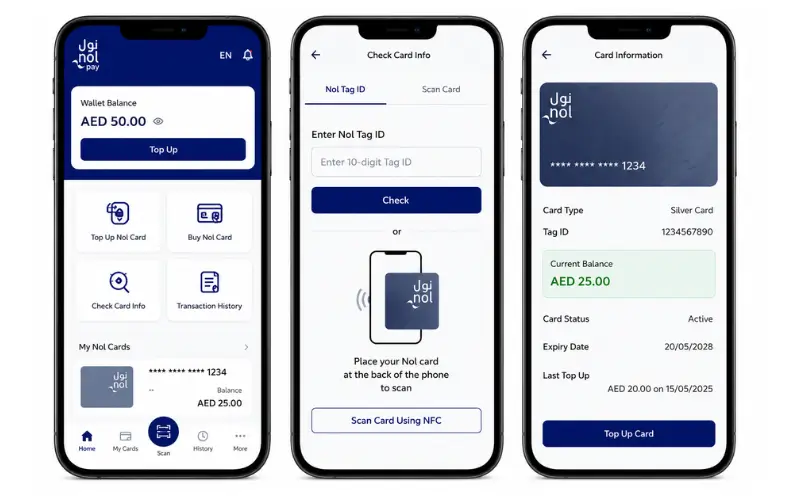
3. Check Your Nol Card With NFC
If your phone supports NFC, you can scan a physical Nol card rather than typing the Tag ID manually.
RTA’s own instructions show the NFC process: open the card-information function, select the scan option, and place the physical card against the NFC area on the back of the phone. The card information screen can then display the balance.
NFC is especially useful if you do not want to search for the 10-digit number printed on the card.
What You Need
- A physical Nol card
- A compatible NFC-enabled smartphone
- The relevant RTA/Nol app
Best for: A fast mobile check without manually entering the Tag ID.
4. Check Nol Balance Through the RTA Dubai App
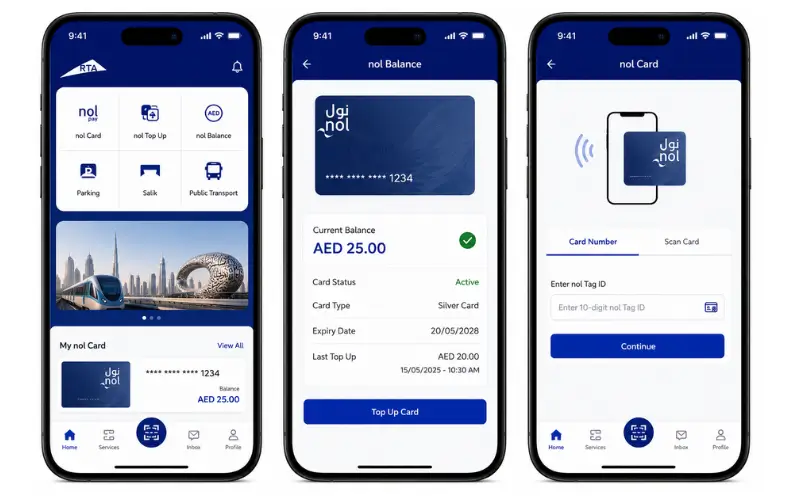
The RTA Dubai app is another official RTA channel for Nol services. RTA’s current service information lists the RTA Dubai app among the smart channels used for Nol card management.
The app can work with a Nol card using its Tag ID or NFC for supported functions. RTA also lists Nol card services through the RTA Dubai app, including top-ups and card management. If you already have the RTA Dubai app installed, it can be more convenient to use the existing app instead of downloading another one.
Best for: Users who already use the RTA Dubai app.
5. Check Nol Card Information Through S’hail
S’hail is RTA’s transport app, and current RTA service information lists it as a smart channel for Nol card services. RTA states that users can work with a Nol Tag ID or scan a physical card using NFC for supported Nol functions. S’haail is particularly useful for people who already use it to plan Dubai public transport journeys.
Keep in mind that RTA’s current FAQ specifically names Nol Pay and the RTA website when answering the question of where to check the Nol balance. S’hail is better described as an additional Nol management channel rather than presenting it as a separate dedicated balance-check website.
6. Check Your Balance at a Dubai Metro Station
If you are already travelling, checking your card at a Dubai Metro station can be more practical than going online.
RTA confirms that ticket vending machines are available at all Metro stations. These machines are primarily used for Nol card purchases and top-ups, and physical Nol card services are available at station equipment.
If your purpose is simply to know whether you have enough money before entering the Metro, the station is also a convenient place to resolve a low balance because you can recharge the card there.
Best for: People who are already at a Metro station.
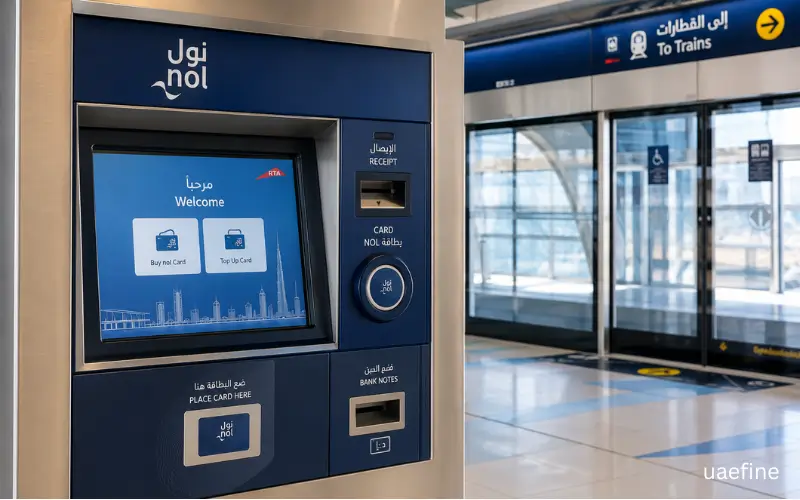
7. Ask at a Metro Ticket Office
If you prefer dealing with station staff, you can take your physical Nol card to a Metro ticket office. RTA lists ticket office machines at all Metro stations and confirms that station agents can handle Nol card top-up transactions. This is useful when your card is not behaving as expected, or you need help with a balance-related issue rather than simply wanting to see a number on a screen.
Best for: Travellers who need staff assistance.
8. Use a Solar Top-Up Machine
RTA also operates solar top-up machines at selected locations. The current RTA service information confirms that physical Nol cards can be used at these machines for top-up services. These machines are more relevant when you are already near one and need to manage your card without using your phone.
Because they are located only at selected locations, this should not be your first choice if you simply want a quick balance check.
Best for: People near a participating solar machine.
9. Check Your Balance When Managing or Topping Up the Card
Another practical situation is checking your available balance when you are already about to recharge your Nol card. RTA physical-card top-up channels include ticket vending machines, ticket office machines,s and other authorised channels.
This approach makes sense if your balance is low. Instead of checking the balance and then finding a separate place to recharge, you can handle both tasks at the same time.
For example, if your balance is below the amount needed for your next journey, you can top up before entering the transport system.
10. Check Your Balance Before or During a Journey
Your Nol card balance becomes especially important when you are about to use public transport. RTA states that a Nol card needs a minimum balance of AED 7.50 to use public transport. That means a quick balance check is worthwhile if you have not used your card for a while or you are unsure how much credit remains.
However, this is not the same as saying that every Metro gate, validator, or reader is a dedicated balance-check service. They are primarily used to process journeys. For an actual balance inquiry, use the RTA website orNoll Pay.
Which Nol Card Balance Check Method Is Fastest?
The answer depends on what you already have available.
If you have your Nol Tag ID
Use the RTA website. You do not need to download an app, and RTA provides a dedicated Check Nol Balance option.
If you have an NFC phone
Use Nol Pay and scan your physical card. This avoids manually typing the 10-digit Tag ID.
If you are already at the Metro
Use the station’s Nol facilities. This is convenient because you can check/manage the card and top it up if necessary.
If you need staff assistance
Go to the Metro ticket office and ask the station agent for help with your Nol card.
What Is the Nol Tag ID?
The Nol Tag ID is the number associated with your Nol card and is required for some online Nol services.
For a physical card, RTA’s instructions identify the Tag ID as a 10-digit number printed on the back of the card.
Do not confuse it with:
- Your card’s remaining balance
- Your Nol card type
- Your PIN
- A transaction reference number
When using the RTA website’s balance checker, the Tag ID is the number you enter into the designated field.
What Is the Minimum Nol Card Balance?
RTA currently states that a Nol card must have a minimum balance of AED 7.50 to use public transport. This is important if you are checking your balance immediately before travelling. A card showing a small remaining amount may not be sufficient for the journey requirements.
RTA also states that AED 7.50 is the minimum balance required to activate pending balance through Metro gates, while the requirement is AED 3.50 for a Blue card in that specific activation context
What If Your Nol Balance Has Not Updated After a Top-Up?
This is one of the most common reasons people check their Nol balance after adding money. If you top up through the RTA website or certain other online channels using the Tag ID, RTA currently says the transaction can take 45 minutes to 4 hours and may require activation.
For example, RTA’s current service information states that website top-ups require waiting 45 minutes to 4 hours, followed by activation through an eligible method such as nol Pay or a Metro gate.
What About NFC Top-Ups?
NFC-based top-ups through nol Pay can be activated immediately after the required second tap. RTA states that the physical card should be placed against the phone’s NFC area again after payment to load the balance.
So if you have just topped up online and the money does not appear immediately, do not assume that the payment failed.
How to Activate a Pending Nol Top-Up
If your top-up is pending, RTA provides several activation options depending on how you made the payment.
For eligible online top-ups, RTA currently lists activation through:
- nol Pay
- Metro gates
- Parking meters
- Solar top-up machines
- Certain supported RTA apps and NFC methods.
There is an important difference between checking a balance and activating pending credit. Seeing a pending amount does not necessarily mean that the money is already available for use on the physical card.
RTA also states that pending online top-ups must be activated within 180 days of the transaction date.
Can You Check Nol Balance Without the Internet?
Yes, there are physical RTA facilities where you can manage your Nol card without relying on an online browser. Metro stations have ticket vending machines and ticket office facilities, while selected locations have solar top-up machines.
However, if you specifically want the simplest dedicated balance inquiry, the RTA website is usually the most straightforward choice when you have internet access and your Tag ID. The official RTA FAQ currently identifies the website and Nol Pay as its direct balance-check methods.
Why Does My Nol Balance Look Different After a Recent Transaction?
A recent top-up or transaction may not appear in the same way immediately across every channel. RTA’s current information distinguishes between immediately usable top-ups and online top-ups that may remain pending for 45 minutes to 4 hours before activation.
If you have just recharged the card, check whether the amount is shown as pending rather than assuming that the money has disappeared. If the problem continues after the stated processing period, use an official RTA channel or contact RTA for assistance.
How Much Can You Top Up on a Nol Card?
Current RTA information says the maximum top-up through online channels is AED 150 per transaction, while the maximum balance is AED 1,000 for Anonymous Nol cards and AED 5,000 for Registered and Personal Nol cards.
Minimum top-up amounts vary by channel. RTA’s July 2026 update lists AED 5 for several channels, while Metro ticket vending machines have an AED 20 minimum and Metro ticket office machines have anan AEDD0 minimum.
These figures apply to top-ups, not the amount you must have simply to perform a balance check.
Nol Card Balance Check Common Problems
RTA Website Is Not Showing the Expected Balance
First, make sure you entered the correct 10-digit Nol Tag ID. If you recently topped up the card, the amount may still be pending depending on the payment channel.
I just topped up, but the Money Is Not on the Card.
If you used an online Tag ID top-up, allow the RTA-stated 45 minutes to 4 hours, and then activate the pending balance using an eligible method.
My Phone Cannot Scan the Nol Car.d
Check whether your phone supports NFC and that NFC is enabled. If scanning is unavailable, you can use the 10-digit Tag ID instead where supported.
My Balance Is Below AED 7.50
RTA states that a Nol card needs at least AED 7.50 to use public transport. Top up before travelling if your available balance does not meet the applicable requirement.
I Need Help With My Card
If the issue cannot be resolved through the website or app, use an RTA customer service or Metro station channel for assistance.
Nol Card Balance Check vs Nol Card Top-Up
These are two different actions.
Balance check tells you how much credit is currently available or associated with the card.
Top-up adds money to the card.
For example, you might check your balance and see AED 6. If you then add AED 20, the top-up may either become immediately usable or appear as pending depending on the channel used. RTA currently distinguishes between instant physical/NFC top-ups and online transactions that can require 45 minutes to 4 hours plus activation.
Is Nol Card Balance Check Free?
Yes. Checking the balance itself does not have a separate fee through the official RTA balance-check service. RTA lists the Nol management service fee as free. Normal mobile data charges may still apply if you are using a mobile app or website over cellular data.
Which Nol Card Balance Check Method Should You Use?
| Your Situation | Recommended Method |
| You have internet and Tag ID | RTA website |
| You have an NFC smartphone | nol Pay |
| You already use RTA Dubai | RTA Dubai app |
| You use S’hail regularly | S’hail |
| You are at a Metro station | Station Nol facilities |
| You need staff help | Metro ticket office |
| You are near a solar machine | Solar top-up machine |
| You just topped up online | Check pending balance and activation status |
| You need to travel soon | Check before entering the system |
For most people, there is no need to try every option. RTA website and Nol Pay are the two methods RTA itself currently identifies for checking your Nol card balance. The other options are useful depending on where you are and what Nol service you need at the time.
Final Thoughts
Checking your Nol card balance is easiest via the official RTA website or the Nol Pay app. The website requires your 10-digit Nol Tag ID, while compatible phones can scan the physical card using NFC within the Nol app.
If you are already at a metro station, Nol facilities and station staff offer another practical way to manage your card. Also, if you have recently topped up online, keep in mind that the transaction may take between 45 minutes and 4 hours to process, and the card might require activation before the funds become available for use.
For regular commuters in Dubai, checking the balance before traveling is a simple way to ensure the card has sufficient credit. The RTA currently states that AED 7.50 is the minimum balance required to use public transport.
Frequently Asked Questions
How can I check my Nol card balance?
You can check it through the Check noNolalance option on the RTA website or through the nol Pay app. RTA currently identifies these two channels specifically for balance checking.
What number do I need to check my Nol balance online?
You need your 10-digit Nol Tag ID, which is printed on the back of a physical Nol card.
Can I check my Nol balance on my phone?
Yes. You can use the noNolay app, and compatible phones can read a physical Nol card using NFC.
What is the minimum Nol card balance in Dubai?
RTA states that the Nol card needs a minimum AED 7.50 balance to use public transport.
Can I check my Nol balance without an app?
Yes. Use the Check Nol balance option on the RTA website and enter your 10-digit Tag ID.
How long does an online Nol top-up take?
RTA currently states that some online top-ups take 45 minutes to 4 hours before activation.
Why is my Nol top-up showing as pending?
Online top-ups made through certain channels require processing and then activation on the physical card. RTA states that these transactions can take 45 minutes to 4 hours before they are ready for activation.
Can I activate a pending Nol balance at a Metro gate?
Yes. RTA lists Metro gates as one of the activation channels for eligible pending top-ups.
Can I check my Nol balance using NFC?
Yes. RTA’s Nol instructions show that a physical card can be scanned using NFC through supported app functions.
Is Nol card balance checking free?
Yes. RTA lists the relevant Nol management service as free.
Can I check my Nol card balance at a Metro station?
You can use the Nol facilities available at Metro stations, and station staff can assist with Nol card services. RTA confirms ticket vending machines and ticket office machines are available at Metro stations.
What should I do if my Nol balance is too low?
Top up the card before travelling. RTA currently requires at least AED 7.50 on the Nol card to use public transport.
